






Normally, we write about food and travel. I’m taking a slight deviation, albeit a related one, to write about the SideTrak Portable Monitor. Why does it make sense for me to write about a techie item? Many of us are working from home now. Businesses and employees have seen how telecommuting can lead to increased productivity. Plus, the ability to go work on the back porch, or a coffee shop, or head out of town on a “workation,” means we’re more portable than ever.
Back when people were in an office, it was common to work on multiple computer screens to see multiple things at once without switching between tabs (so many tabs). Even if companies let people bring those screens home, they take up a lot of space on a home office desk or worse, the dining table-turned-desk. And many, like me, work exclusively on a laptop but wish we had the ability to have multiple screens for multi-tasking. When I heard about a way to add a computer screen to my laptop…that slid out of view when I didn’t need it…that allows me to move from room to room easily, I wanted to know more. And here’s where this makes total sense for readers of Real Food Traveler – with this device, now we can hit the road and work remotely in a different destination (doing some safe travel), with our laptops, and still work at our maximum productivity! I received a SideTrak Portable Monitor to try out and it is no exaggeration to say it has completely changed the way I work.

Get the benefits of a secondary screen while being able to work anywhere. Photo courtesy SideTrak.
Important things to know about the SideTrak Portable Monitor:
It’s easy to attach and set up. I’m not a particularly techie person but I attached it to the lid of my laptop, plugged in the chord (it comes with a standard USB port adapter for slightly older laptops like mine). Once it’s plugged in, there’s a simple step to take on your laptop that tells it to start using a second screen. Easy peasy.
The screen itself sits within a bracket that attaches to the lid of your laptop. When not in use, you slide it back in and your laptop is less than an inch thicker. When you want to use it, simply slide it out and it’s on. Angle it to the position that works for you. There’s a model that swivels so you can also turn it around to show someone else in the room (like, if you were meeting with someone and didn’t want to sit side-by-side because A) it’s not socially distant and B) it’s always awkward). There’s also a version that is a stand-alone for laptops but I really love the ability to not have to find desk space for the second monitor.
Why the SideTrak is a game changer for life moving forward:
I’m a major multi-tasker. I have to be. I have multiple tabs open at any given time, all day long. To be able to have one screen of information viewable to refer to, as I work on another screen related to it, means I don’t have to keep flipping back and forth. And that means my productivity goes up. I have exactly what I need viewable at one time. You can probably relate.
People are on the move! Even within our own homes, it’s nice to be able to pick up a laptop computer and move around the house to work for a change of scenery (a home office, the kitchen table, the back porch on a sunny day), They can now get the benefit of having a secondary screen to move around with them (which they couldn’t with a desktop computer and extra monitor). Many people are taking advantage of being able to go work elsewhere, renting a property, some even moving away, to be digital nomads. The SideTrak makes it possible to maximize worktime outside the office you shared with your co-workers.
To learn more about the portable monitor, including to check out the specifications your laptop needs to have (my 4-year-old laptop does fine), visit their website. There are various versions of the SideTrak plus add-on accessories available through their website as well as on Amazon.com.
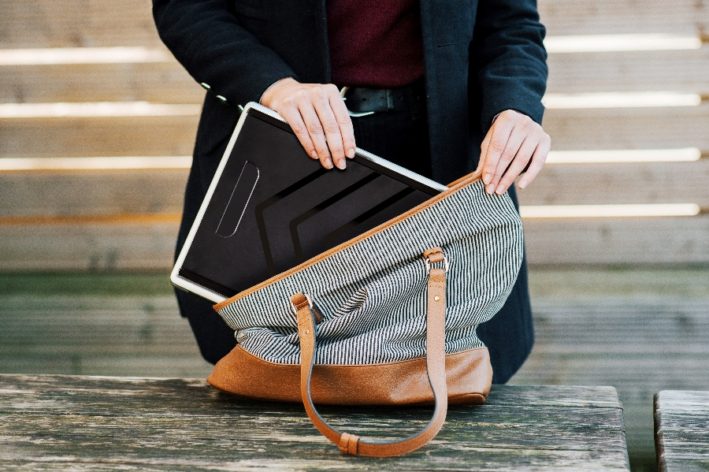
Because the SideTrak doesn’t add much thickness to your laptop, it’s still very portable. Photo courtesy SideTrak.
Please note, RealFoodTraveler.com is a participant in the Amazon Services LLC Associates Program, an affiliate advertising program designed to provide a means for sites to earn a small amount of advertising fees by linking to Amazon.com while providing convenience for the reader. Also, we received a sample of the product to facilitate this article but our opinions, as always, are our own, honest and true.
Hungry for more? We love it so much, we’ve added the SideTrak portable laptop monitor to our list of Unusual Things to Pack for a Trip. You can read that list, here for tips to make your getaway and nomad stays safer and more enjoyable.
Pin it to share with others.









0 Comments